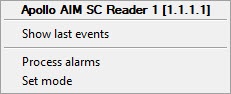
You can manage the readers of the AIM SC module in the Map interactive window using the function menu of the Apollo AIM SC Reader object.
Description of the function menu commands of the Apollo AIM SC Reader object is given in the table:
Function menu command | Function |
|---|---|
| Process alarms | Processes alarm states |
| Set mode | Selects the working mode of a reader |
The following states of the reader are possible:
| Closed |
| Card only |
| PIN or card |
| Card and PIN |
| Opened |
| Facility code |
| Central lock emulation |
| Tamper |
| Tampered |
| Holding |


