By default the Debug window is disabled. To enable the Debug window, do the following:
- Shut down Intellect.
Run the Tweaki.exe utility.
| The Debug window can be enabled without the tweaki.exe utility. For this set values 1, 2 or 3 for the Debug string parameter in the HKEY_LOCAL_MACHINE\SOFTWARE\ITV\Intellect section of the Windows registry (HKEY_LOCAL_MACHINE \Software\Wow6432Node\ITV\Intellect for 64-bit system). |
- Select Intellect section in the tree on the left side of the utility dialog box.
- Change the value of the Debug mode parameter from Disabled to Debug 1, Debug 2, Debug 3, or Debug 4. Any of these modes will enable the Debug window, the difference between them is in the amount of information written to the log files (see The Settings panel of the Intellect section).
- Click the OK button.
- Start Intellect.
A new Debug window item appears on the Main control panel of Intellect.

This menu is also available in the Windows notification area (system tray)—left click on the  button or short click the F8 hot key. button or short click the F8 hot key.
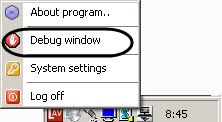 |
- Select the Debug window item on the Main control panel in order to display the Debug window on the monitor. The selected Debug window item is marked with a flag.

To hide the Debug window, re-select the Debug window item on the Main control panel.
| To disable the Debug window, select the Disable value for the Debug mode in the tweaki.exe utility or set value 0 for the Debug string parameter in the HKEY_LOCAL_MACHINE\SOFTWARE\ITV\Intellect section of the Windows registry (HKEY_LOCAL_MACHINE \Software\Wow6432Node\ITV\Intellect for 64-bit system). These actions are performed when Intellect is exited. |