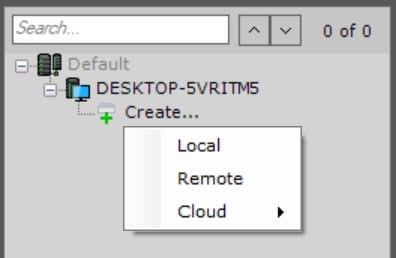
In the branch of the Server object corresponding to the computer on which you need to organize an archive, click the Create link.
- block, if you need low latency and high performance in various situations. For example, for tasks with a large read and write load;
object, if a technical support specialist recommended you to use this type of storage.
It is not recommended to use object type of storage without prior consultation with AxxonSoft technical specialist.

Configure archive volumes.
- Set the checkboxes next to the disks that you want to include in the archive.
If a disk does not have a file system, the disk can contain an archive volume in the form of a partition. In this case, set the Format checkbox. This will format the disk to the SolidStore file system developed by AxxonSoft (see General information of SolidStore file system).

- When selecting the disk on which to place the archive volume, take into account its space. If the archive is completely full, the oldest data will be overwritten with new data.
- The file system on the disk can be erased by using the standard Disk Management utility in Windows. For the manual for starting and using the utility, see Microsoft website. Deleting the file system on the disk in the Disk Management utility consists of the following:
- delete logical disk;
- create a new disk in the resulting unformatted area.
- assign a letter to the disk, but do not format it.
The system disk cannot be completely allocated for an archive.
- You cannot create an archive volume as a partition on a removable disk, since its partition cannot be erased through the Disk Management utility.
On disks that have a file system, you can store an archive volume in the form of a file.
For this archive volume, you must enter a file size (in gigabytes) or set it by moving the slider. The size of the archive file must be greater than or equal to 1 GB. For the Fat32 file system, the maximum archive size is 4 GB.
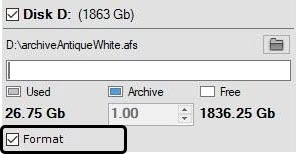
- If the archive is completely full, the oldest data will be overwritten with new data.
- By default, the file name will be the same as the name of the archive, and the file will be located at the root directory of the disk. To change the name and/or location of the file, click the
 button.
If volumes are configured in the form of partitions, a dialog box will be displayed, warning about formatting of the relevant system disks.
