A detailed description and operating instructions for the ETHM-A module via GX Soft tool can be found on the official Satel website: ETHM-A – SATEL. |
To configure minimum required settings which allow communication between Satel2 ETHM-A universal monitoring module and Axxon One, read the instructions below.
To connect the GX Soft tool to the Satel2 ETHM-A universal monitoring module, do the following:
Recommended version: 2.1.5 or later. |


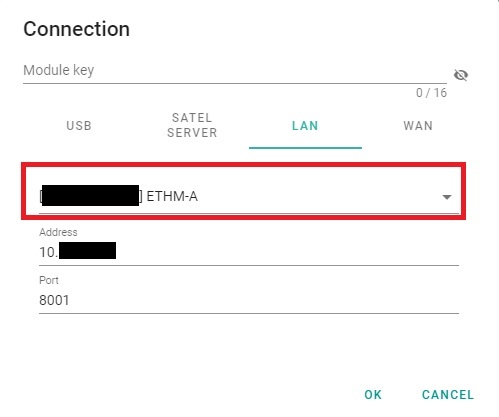
If the settings are correct, you will be able to establish the connection by clicking the dedicated button on the top panel.
GX Soft tool allows you to view the status of the module's inputs and outputs in real time. You can preview the status by clicking the Input/Output states button.
Configuration of Satel2 ETHM-A inputs and outputs is not possible via Axxon One VMS; you can configure them via GX Soft tool. |
In order to configure inputs and outputs of Satel2 ETHM-A universal monitoring module, please refer to the ETHM-A general information manual, available on the manufacturer's website.
In order to prepare the connection between Axxon One server and Satel2 ETHM-A universal monitoring module, do the following:


| Parameter | Recommended value | Description |
|---|---|---|
| IoT | Enabled | Enables IoT |
| Polling type | JSON/HTTP | Polling type |
| Port | NA | Port used to send data to Axxon One. Default port is 8080 |
| Server | [Axxon One server IP address] | Specifies the computer to which the universal monitoring module will send the data to |
| Polling | NA | Polling time in DD:HH:MM:SS format |
| HTTP header | POST http://%H%:%P%/write HTTP 1.1 User-Agent: ETHM-A %V% Content-Type: application/json | HTTP header for sending events to Axxon One |
| Options | NA | Defines situations in which the universal monitoring module will send messages with data to Axxon One |
| Frame | NA | Defines the settings that the GX Soft software will upload to the universal monitoring module upon request |