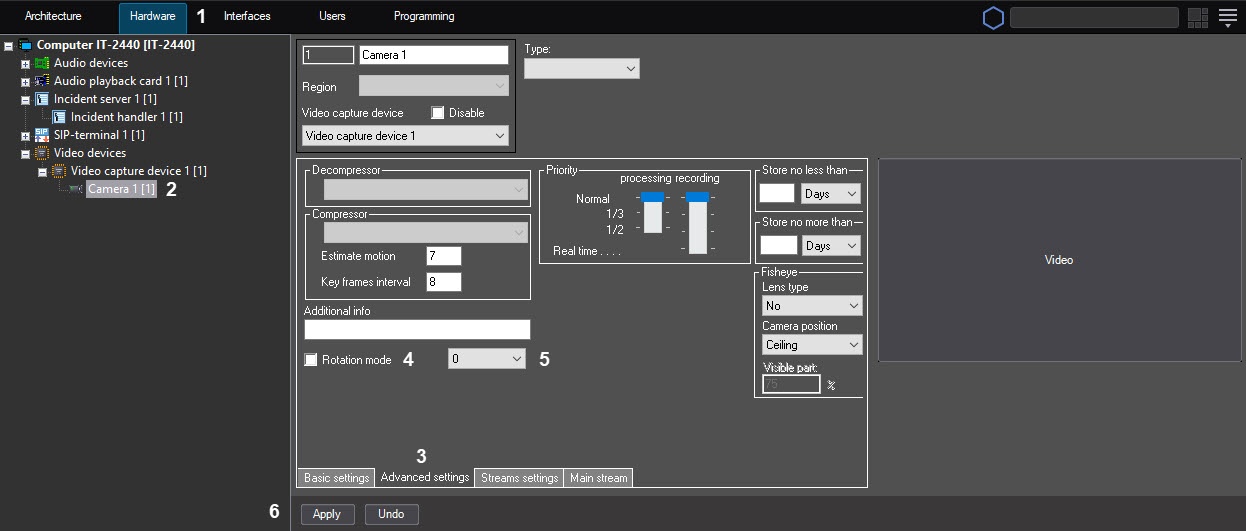
In Axxon PSIM, you can rotate an image that is coming from a camera when displaying it on the Video surveillance monitor and viewing the video archive. The available rotation angles are 90, 180, and 270 degrees. The video image is rotated counterclockwise.
To configure the rotation angle, do the following:
| By default, the video signal is displayed in the Surveillance window in the initial non-rotated state. To rotate the video image, select the Pan function in the Processing sub-menu of the Surveillance window, see the Video image rotation section of the Operator's Guide document. |
Configuring the rotation angle of the video image is complete.