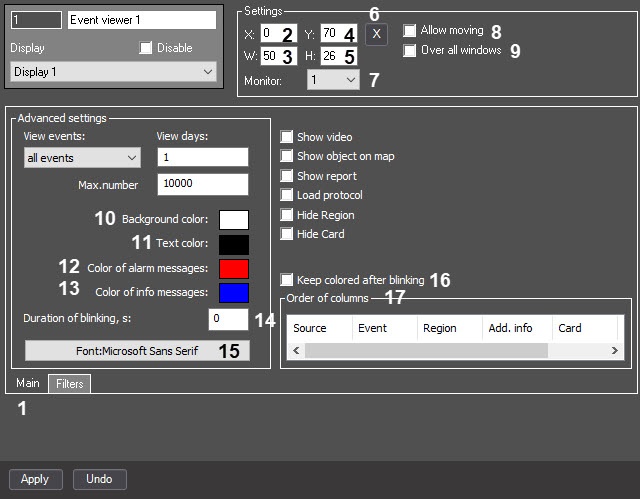
- Enter the coordinates of the Event viewer window:
- X (2)—horizontal indent from the left border of the screen;
- Y (4)—vertical indent from the top border of the screen;
- W (3)—width of the window;
- H (5)—height of the window.
Coordinates are set as a percentage of the corresponding screen dimensions horizontally and vertically, respectively.
- Click the
 button (6). This opens a window for setting the size and location of the Event viewer window using the mouse.
Set the color of alarm messages in the Event viewer interface window (12):
For this, double-click the Color of alarm messages field;
In the Color window that opens, select the required color;
Click the OK button.
To apply the setting, the value of the Duration of blinking, s parameter (14), must be different from 0.
Specify the color of info messages in the Event viewer interface window (13):
For this, double-click the Color of info messages field;
In the Color window that opens, select the required color;
Click the OK button.
To apply the setting, the value of the Duration of blinking, s parameter (14), must be different from 0.
The blinking frequency is 2 seconds, and the blinking duration is 1 second. To ensure the blinking, we recommend setting the parameter value to at least 2. |
- Click the Font:<current font> button (15);
- In the Font window that opens, set the font parameters;
- Click the OK button.
- Select the name of a column and move it with the mouse holding down the left button.
- Select the name of a column and move it with the left and right buttons.
If you set the Hide Region and/or Hide Card checkboxes, the corresponding columns aren't displayed in the Event viewer window.