클라이언트(AxxonOne 클라이언트) 및 서버(AxxonOne 서버)의 원하는 로깅 수준을 선택합니다 (1).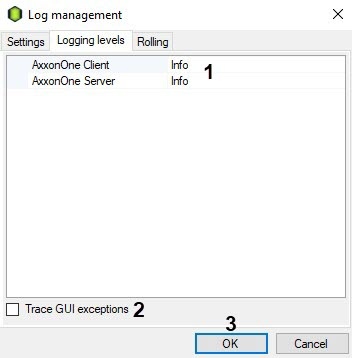
서버의 로깅 수준을 변경하면 서버가 다시 시작됩니다. |
If the Axxon One VMS is installed in the Failover Server and Client configuration, you can log in as either a Client or a Supervisor. |
Logging level | Logging level description |
None | Event logging disabled |
Error | Low specification level – only system errors are logged |
Warning | Low level of detail - only system warnings and system errors are logged |
Info | Low level of detail - logs informational messages, system warnings, and system errors |
Debug | Medium level of detail - logs debugging events, informational messages, system warnings, and system errors |
Trace | High specification level – all system events are logged |
If you need to include GUI exceptions into the logs, select the corresponding check box (2).