In Auto PSIM, you can set up ports for notification and XML notification about license plate recognition of the LPR channel.
To set up ports for notification, do the following:
- Go to the Saving settings tab of the LPR channel object.
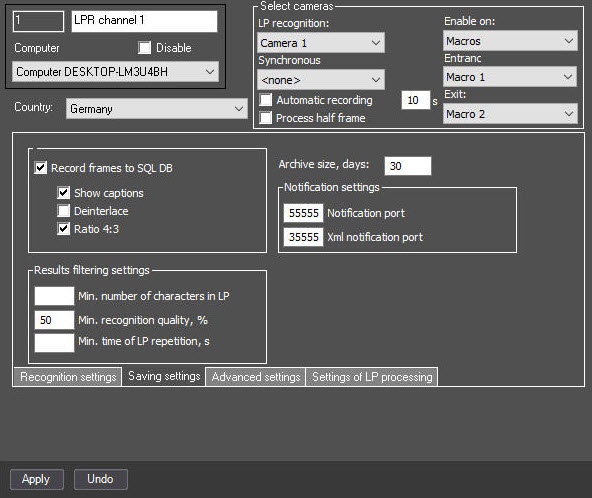
- In the Notification port field, specify the number of the port for license plate recognition events. The default value is 55555.
- In the Xml notification port field, specify the number of the port for license plate recognition events in XML format. The default value is 35555.
To enable the mode of even load distribution, specify the IsProcessObject=1 parameter of the HKEY_LOCAL_MACHINE\SOFTWARE\Wow6432Node\AxxonSoft\PSIM\URMLPR registry section (see Registry keys reference guide. For the information on working with the registry, see Working with Windows OS registry), then each recognition channel is started in a separate process. In this case, you must specify the notification port and XML notification port for each recognition channel. |
- Click the Apply button to save the settings.
Setting up ports for notification and XML notification is complete.