Configuration of the VI detection of prohibited direction module includes general settings and configuration settings: detection zone, configuration parameters, and detector characteristics.

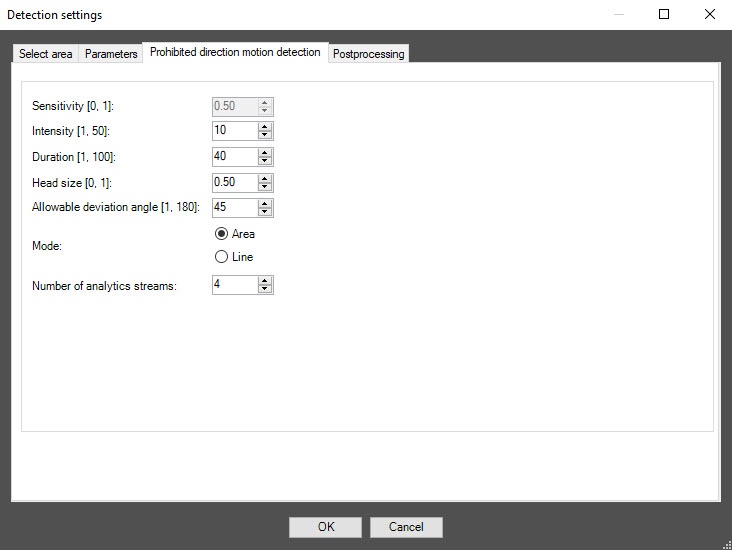
In the Intensity [1, 50] field, specify in arbitrary units in the range 1–50 how noticeable the object's movement in the detection zone must be for the detector to generate an event. The default value is 10. If you enter a value out of range, it is automatically changed to the appropriate border value. If you select the Line mode in the Mode parameter, this setting is disabled.
In the Duration [1, 100] field, specify in arbitrary units in the range 1–100 the duration of the object’s movement in the prohibited direction. It can be used when analyzing dense passenger flows, when an object making its way in the opposite direction appears in the camera’s FOV only for short time intervals, and the rest of the time is hidden from view by the crowd. The default value is 40. If you enter a value out of range, it is automatically changed to the appropriate border value. If you select the Line mode in the Mode parameter, this setting is disabled.
When you change the mode, all settings return to default values on the Select area tab. |

 button to the right of the zone name.
The maximum number of detection zones is 20. To rename a detection zone, enter a new name in the field to the right of its number. The new name appears in the zone caption on the video image. If any of the specified zones and directions are incorrect, they are automatically replaced with a single default zone and direction after you save and reopen the settings. After you delete all zones and directions, save and reopen the settings, a single default zone and direction are automatically added. |
button to the right of the Direction setup item that must be selected, that is, highlighted in blue. button to the right of its name.
The maximum number of detection lines is 20. To rename a detection line, enter a new name in the field to the right of its number. The new name appears in the line caption on the video image. If any of the specified lines and directions are incorrect, they are automatically replaced with a single default line and direction after you save and reopen the settings. After you delete all lines and directions, save and reopen the settings, a single default line and direction are automatically added. |

To enable debug logging mode in the VI SDK and collect detailed information about the configuration of VI detectors, use the ViDetectorDebug=1 parameter of the HKEY_LOCAL_MACHINE\SOFTWARE\WOW6432Node\AxxonSoft\PSIM\DetectorExt registry key (for more details, see the registry key reference guide in Vertical solutions; for information on working with the registry, see Working with Windows OS registry). |
Configuration of the VI detection of prohibited direction module is complete.