
The Deinterlacing tool is used to correct tooth-type distortions (also called "combing artifacts"), which appear on the borders of video image fragments when objects move quickly relative to the background.
An example of a combing artifact is shown in the picture below.
To utilize this tool, select the Deinterlacing option in the Visualization context menu.
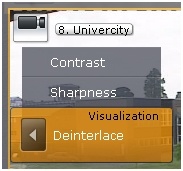
The image in the viewing tile will then be corrected.
To disable Deinterlacing, reselect the Deinterlacing option.