Unable to render embedded object: File (books.jpg) not found.
Go to documentation repository
Documentation for Axxon Next 3.5.1. Documentation for other versions of Axxon Next is [available too].

The dialer panel is used to switch to a PTZ preset.
To display the dialer panel, click the Dialer button. The dialer panel will then be displayed on the PTZ control panel.
The Dialer button:

The Dialer panel:
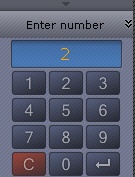
To hide the dialer panel, click the Dialer button again.
Switching to a PTZ preset using the dialer panel is described in detail in the section titled Control Using the Dialer Panel
Overview
Content Tools