
Go to documentation repository

Documentation for Axxon PSIM 2.0. Documentation for other versions of Axxon PSIM is available too.
Previous page Next page

The figure shows the idb.exe utility dialog window.
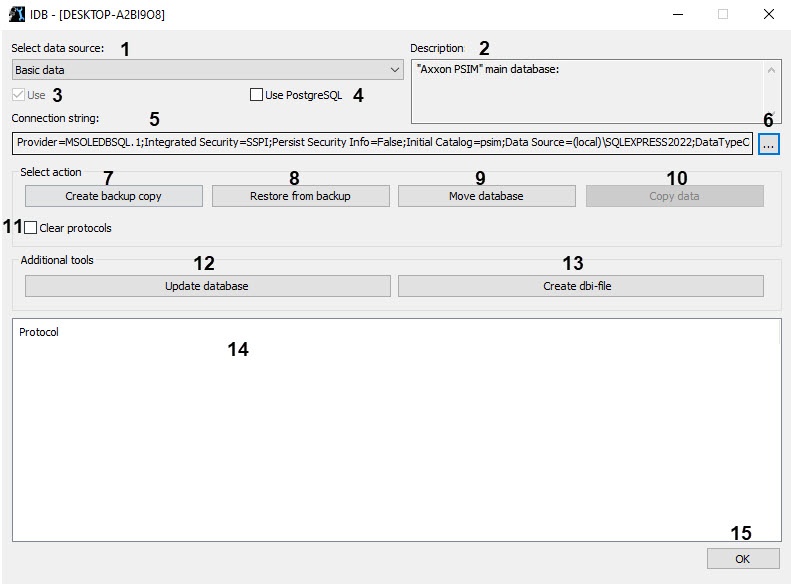
The table describes the interface elements of the idb.exe utility dialog window.
№ | Element name and type | Purpose | Default value | Allowed values |
1 | The Select data source drop-down list | The list for selecting the database type for administering | Basic data |
Other values are used when you work with vertical solutions |
2 | The Description field | The information field that displays the common information about the database type selected from the Select data source drop-down list | Axxon PSIM main database |
Other values depend on the availability of the databases for the installed vertical solutions |
3 | The Use checkbox | The checkbox used to enable or disable the mode of using the database of the selected type | Set | Set—database is connected Clear—database isn't connected |
4 | The Use PostgreSQL checkbox | The checkbox used to enable the mode of using PostgreSQL | Clear | Set—PostgreSQL is used Clear—PostgreSQL isn't used |
5 | The Connection string information field | The string that displays the summary information about the database connection parameters | Depends on the database connection parameters, the server or the Remote Administrator workstations configuration | Contains the combination of the following parameters: Provider, Integrated Security, Persist Security Info, Data Source. The Provider parameter can take the following values:
The Integrated Security parameter can take the following values:
The Persist Security Info parameter can take the following values:
The Data Source parameter can take the following values:
|
6 | The | The button used to open the Data Link Properties window. Note. Starting with SQL Server 2022 (16.x) and SQL Server Management Studio 19 versions, the SQL Server Native isn't supplied. As a result, the OLE DB provider is the Microsoft OLE DB Driver for SQL by default on the Provider tab of the Data Link Properties window | NA | NA |
| The Select action group | ||||
7 | The Create backup copy button | The button used to start the process of creating the database backup copy. This button is active if the idb.exe utility is connected to the database of the MS SQL format | Active | Active—the idb.exe utility is connected to the database of the MS SQL server format Inactive—the idb.exe utility isn't connected to the database of the MS SQL server format |
8 | The Restore from backup button | The button used to restore the database from the previously created backup copy | Active | Active—the idb.exe utility is connected to the database of the MS SQL server format Inactive—the idb.exe utility isn't connected to the database of the MS SQL server format |
9 | The Move database button | The button used to transfer the MS SQL Server database files (.mdf and .ldf) to the specified folder. The user must have rights to create files in this folder. After you move files, the database is automatically attached. Note. You can move only the local database (the Basic data data source). When you use the remote database (the Synchro source data source), you cannot move files | Active | Active—the idb.exe utility is connected to the database of the MS SQL server format Inactive—the idb.exe utility isn't connected to the database of the MS SQL server format |
10 | The Copy data button | The button used to copy the data. Note. The button is active if you set the Use PostgreSQL checkbox | Inactive | Active—the idb.exe utility is connected to the database of the MS SQL server format Inactive—the idb.exe utility isn't connected to the database of the MS SQL server format |
11 | The Clear protocols checkbox | The checkbox that is used to exclude the event log database from the created database backup copy. We recommend using it if the size of the event log database is too large and there is no need to include the event log in the backup copy. The setting is available only for the Axxon PSIM base database | Clear | Set—the database backup copy doesn't include the event log database Clear—the database backup copy includes the event log database |
| The Additional tools group | ||||
12 | The Update database button | The button used to start the process of updating the database structure. | Active | Active—the idb.exe utility is connected to the Configuration database Inactive—the idb.exe utility isn't connected to the Configuration database |
13 | The Create dbi-file button | The button used to create the .dbi database structure file (template) | Active | Active—the feature of creating the .dbi file is available |
| Out of the group | ||||
14 | The Protocol information table | The information table that displays the progress of the database processing: converting, structure updating, creating the backup copy, and so on | Empty | Information messages about the progress of the database processing.
|
15 | The OK button | The button used to store the Axxon PSIM database connection parameters and shut down the idb.exe utility | Active | Active—saving the database connection parameters and shutting down the idb.exe utility Inactive—the utility is still processing the database |

Overview
Content Tools