
Go to documentation repository


Page History
...
Figure shows the toolbar in the script editing mode.

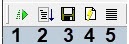
Table shows the elements of the toolbar in the script editing mode.
...
Figure shows the toolbar in the script debugging mode.
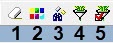
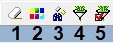
Table shows elements of the toolbar in the script debugging mode.
№ | Element name | Element type | Description | Units | Default value | Value range |
1 | Clear | Button | Clears the Description field in the debugger window | - | - | |
2 | Colors | Button | Opens the window allowing to specify the words that a line should contain to be highlighted in color | - | - | - |
3 | Search | Button | Searches for a word in the Description window | - | - | - |
4 | Set filter | Button | Opens the window allowing to set the filtering criteria for the messages in the debugger window. | - | - | - |
5 | Apply filter | Button | Applies the current filter | - | - | - |
Overview
Content Tools