
Go to documentation repository


Page History
To input access card number manually, do the following:
- Go to user editing a user (see Going to user editing).
- Click the right mouse button in card selection Right-click the list of cards area.
- Select the Add item in the opened functional function menu.

The window of input Window for inputting object code and card code will openopens.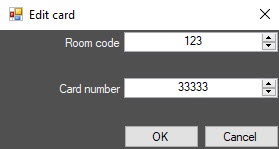
- Enter the object code (facility - code, room code) in the the Room code field (1).
- Enter the card code in the Card number field (2).
- Click the OK button (3).
- The card will be added to the list.

Input of access card number manually is completed.
| Info | ||
|---|---|---|
| ||
You can also can input input access card number manually using the corresponding buttons (see Specifying user parameters). |
...
Overview
Content Tools