
Go to documentation repository


To input access card number manually, do the following:
- Go to user editing (see Going to user editing).
- Right-click the list of cards area.
- Select the Add item in the function menu.

Window for inputting object code and card code opens.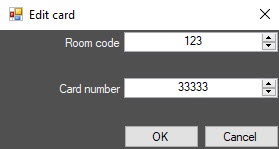
- Enter the object code (facility code, room code) in the Room code field.
- Enter the card code in the Card number field.
- Click the OK button.
- The card will be added to the list.

Input of access card number manually is completed.
Note
You can also input access card number manually using the corresponding buttons (see Specifying user parameters).
Overview
Content Tools