
Go to documentation repository


Page History
In the Axxon PSIM software the image from the video camera can be panned while , you can rotate an image that is coming from a camera when displaying it on the Video surveillance monitor and viewing the video archive. Available The available rotation angles are 90, 180, and 270 degrees. The video image is rotated counterclockwise.
To configure the rotation angle, do the following:
- Go to the Hardware tab of the System settings dialog box window (1).
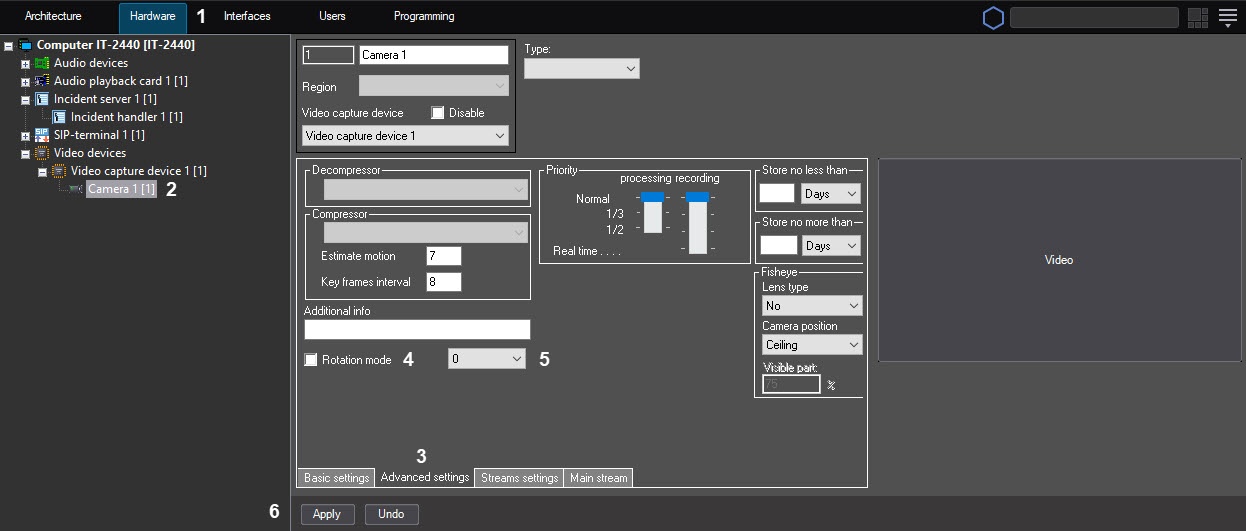
- Select the Camera object corresponding
- (2) that corresponds to the video
- camera from which the
- whose video image is to be rotated while displaying (2)
- you want to rotate at the display.
- Go to the Advanced settings tab (3).
- Set the Rotation mode checkbox (4) to activate the rotation function (4).
- From the drop-down list (5), select the rotation angle (5).
- To save the settings in the Axxon PSIM software, click the the Apply button (6).
| Info | ||
|---|---|---|
| ||
| On By default, the video signal is displayed in the Video surveillance Surveillance window in the initial non-rotated state. To rotate the video image, select the Pan function in the Processing sub-menu of the Video surveillance Surveillance window − see , see the Video image rotation section of the Operator's Guide document. |
Configuring a the rotation angle of the video image is completedcomplete.
Overview
Content Tools