
Go to documentation repository
You can install, repair, update, and remove POS PSIM in quiet mode.
To start installationIt is possible to install POS-Intellect software in silent mode. To do this, select one of the following options:
In the setup.ini file, located in the directory with the POS -IntellectPSIM distribution kit (see Installation), specify enter the following:
| Code Block |
|---|
CmdLine= /quiet |
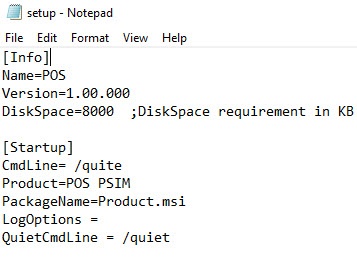
When you run the Setup.exe filefile, the POS -IntellectPSIM installation in silent mode will beginbegins.
Go to the directory with the POS -IntellectPSIM distribution kit , and enter use the following command at the Windows command prompt:
| Code Block |
|---|
setup.exe /quiet |
Windows command line to specify the parameters of the setup.exe file. The parameters of the setup file are listed in the table.
| Parameters of the setup.exe file in the command line | Description |
|---|---|
/x | Removal of POS PSIM |
/uninstall | Removal of POS PSIM |
/r | Repair of POS PSIM |
/repair | Repair of POS PSIM |
/qn | Installation/update of POS PSIM |
/quiet | Installation/update of POS PSIM |
/norestart | Disable automatic system restart during installation |
/debug | Logging |
/LANG=”en” | Select the English language for the installation program |
/CMD="[commands]" | Property values for the base installation program, where commands is [Property]="[Value]" or [Property]='[Value]'. The available properties of the installation program are listed in the table below |
Immediately after running this command, the the POS -Intellect installation in silent mode will beginPSIM installation in quiet mode begins.
When the setup.exe process completes in Windows Task Manager, the installation finishes as well.
| Info | ||
|---|---|---|
| ||
During installation of POS PSIM in quiet mode, the computer will restart. After the restart, the installation process continues automatically. |
Example of running the POS PSIM installation/update in quiet mode with the setup.exe file
setup.exe /quiet /norestart
This action launches the setup.exe file with the following parameters:
The program installs POS PSIM in quiet mode (/quiet).
Automatic system restart during installation/update is disabled (/norestart).
Example of running the POS PSIM repair in quiet mode with the setup.exe file
setup.exe /r /quiet /norestart
This action launches the setup.exe repair file with the following parameters:
The program repairs POS PSIM (/r).
The program repairs POS PSIM in quiet mode (/quiet).
Automatic system restart during repair is disabled (/norestart).
Example of running the POS PSIM uninstaller in quiet mode with the setup.exe file
setup.exe /x /uninstall /quiet /norestart
This action launches the setup.exe uninstaller with the following parameters:
The program uninstalls POS PSIM (/x /uninstall).
The program uninstalls POS PSIM in quiet mode (/quiet).
Automatic system restart during uninstallation is disabled (/norestart).
You can use the Windows system utility Msiexec.exe to determine the parameters of the Product.msi installation file in the Windows command line.
Example of running the POS PSIM installation/update in quiet mode with the Msiexec.exe utility
msiexec /i Product.msi /qn /norestart
This action launches the MSI installation file with the following parameters:
The program installs/updates POS PSIM (/i Product.msi).
The program installs/updates POS PSIM in quiet mode (/quiet).
Automatic system restart during installation/update is disabled (/norestart).
Example of running the POS PSIM uninstaller in quiet mode with the Msiexec.exe utility
msiexec /x Product.msi /qn /norestart
This action launches the MSI installation file with the following parameters:
The program uninstalls POS PSIM (/x Product.msi).
The program installs/updates POS PSIM in quiet mode (/qn).
Automatic system restart during uninstallation is disabled (/norestart).
Example of running the POS PSIM repair in quiet mode with the Msiexec.exe utility
msiexec /fvomus Product.msi /qn /norestart
This action launches the MSI installation file with the following parameters:
Automatic system restart during installation/update is disabled (/norestart).
The program repairs POS PSIM (/fvomus Product.msi):
Overwrites all necessary files (m).
Installation, repair, update, and removal of POS PSIM in quiet mode are complete.

