
Go to documentation repository


Page History
The data about the events registered in the system is stored in the Protocol table in Axxon PSIM the Psim database (by default) or in the Protocol table of an individual database (see the Protocol table in a separate database (see Extracting event protocol into an individual database).
The Event Viewer database is configured You can configure the database of the event viewer by means of the settings panel of the the Computer system object.Configure the Event Viewer database as follows:
- To disable events recording event logging to the Event Viewer database of the event viewer, set the the Disable logging checkbox (1). This setting is relevant only for the Server server corresponding to the the Computer object.
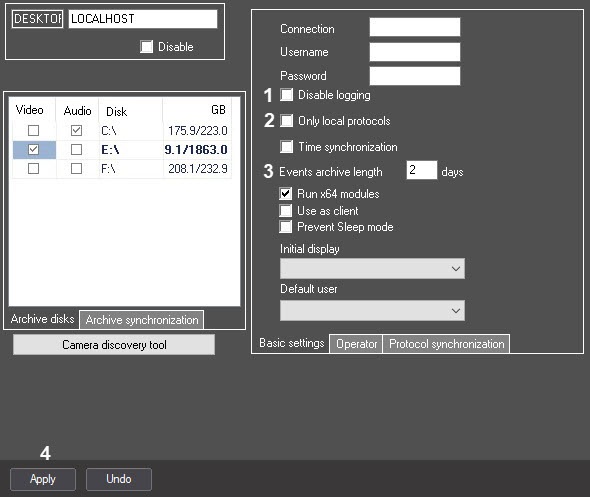
- Set the Only local protocols checkbox in case when only If you want to log to the database of the event viewer only the events registered on this computer are to be logged to the database , set the Only local protocols checkbox (2). This setting is relevant only for the Server server corresponding to the the Computer object.
If you set this checkbox is set checked, then you must start the synchronization of the event log viewer database synchronization is to be started manually using the SyncProtocol.exe utility or a macro (see The SyncProtocol.exe utility to synchronize event log database and Example of macro to start the Event Viewer databases synchronization). In the Events archive length field field (3), specify the time period in days for storing the event archive in the Event Viewer database (3)event viewer database. This setting is relevant only for the Server server corresponding to the the Computer object. To specify the time period for storing the event archive for all Servers servers in the distributed system, use the common settings in the the Programming tab (see The Settings settings panel of the Security zone object section). The The value of the Events archive length parameter on the settings panel of the Computer object has the higher priority.
Info title Note If no value is specified in the Events archive length field on the
configurationsettings panel of the Computer object, the value specified in the
configurationsettings panel of the Security zone object is used.
Click the Apply button to save all the changes (4)Info title Note The specified Events archive length is also applied to the events received by the incident server that are stored in the PROTOCOL_INC_SERVER table of the Psim database.
Info title Note
...
The process of clearing the database of the events older than the specified storage period is started by default every three minutes and deletes 100,000 events starting with the oldest ones.
- Click the Apply button to save the changes (4).
The event logging to the The Event Viewer database is now configured.
| Info | ||
|---|---|---|
| ||
| The You can also use the tweaki.exe utility can also be used to configure events viewing event logging (see the The Settings panel of the Axxon PSIM section). |
Overview
Content Tools