
Go to documentation repository


Page History
...
| Note | ||
|---|---|---|
| ||
When you disable internal synchronization, you must configure the database synchronization—see Configuring database synchronization and Configuring the Event Viewer event viewer databases synchronization. |
To configure internal synchronization, do the following:
- Go to the Programming tab of tab of the System settings window (1).
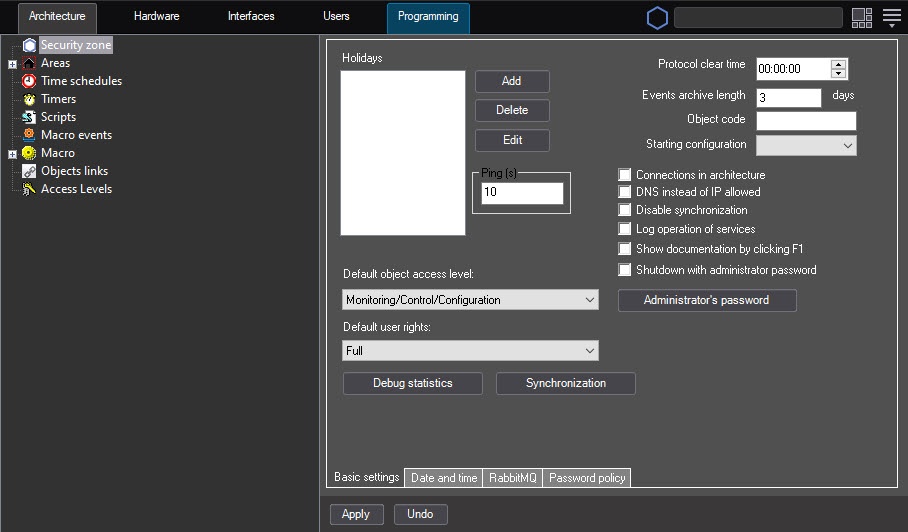
- In the objects object tree, select the Security zone object (2). The settings panel of this object is displayed on the right side of the System settings window.
- To disable synchronization, clear the Disable synchronization checkbox (3).
- To eliminate desynchronization, click the Synchronization button.
- Click the Apply button (4).
Info title Note
Configuration of internal synchronization is complete.
The system can display the problems with server connection in the following ways:
 —the server is connected but not synchronized (time is off by more than a minute in either direction).
 —the connection failed for some reason.
 —if the connection process takes a long time.
| Note | ||
|---|---|---|
| ||
If there is a server-remote client configuration, and you don't use the remote client as a client, such a workstation is always displayed as |
...
object tree correctly. |
| Info | ||
|---|---|---|
| ||
You can use the parameter (30 seconds by default) of the MaxTimeDesyncReauthDelay key of the registry HKEY_LOCAL_MACHINE\SOFTWARE\WOW6432Node\AxxonSoft\PSIM\ to specify the time in seconds allowed between the first attempt of a client that is not synchronized by time to connect to the server and the second attempt to connect to the server with a special token (see Registry keys reference guide) |
...
. |
Overview
Content Tools