
Go to documentation repository

Documentation for Axxon PSIM 2.0. Documentation for other versions of Axxon PSIM is available too.
Previous page Next page

By default, Axxon PSIM uses internal synchronization, that is, the transfer of changes between computers in the distributed system (see Configuring the interaction of distributed system components).
If the computer is disconnected for a long period of time, the accumulated sequence of events can become quite big, and it will take a long time for the reconnected computer to process all the accumulated events. Thus, you can disable synchronization.
Note
You can enable and disable internal synchronization for all computers in the distributed system.
Attention!
When you disable internal synchronization, you must configure the database synchronization—see Configuring database synchronization and Configuring the Event Viewer databases synchronization.
To configure internal synchronization, do the following:
- Go to the Programming tab of the System settings window (1).
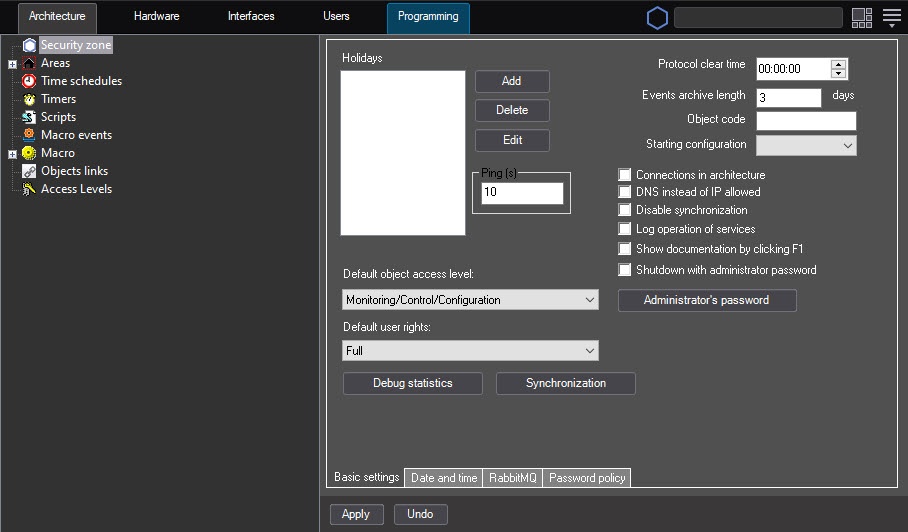
- In the objects tree, select the Security zone object (2). The settings panel of this object is displayed on the right side of the System settings window.
- To disable synchronization, clear the Disable synchronization checkbox (3).
- To eliminate desynchronization, click the Synchronization button (4).
Note
When desynchronization occurs in the objects tree, it is displayed in the following way:

- Click the Apply button (5).
Configuring internal synchronization is complete.
Overview
Content Tools