
Go to documentation repository


To create and set up the Keyboard system object in Axxon PSIM™ software, follow the sequence:
- Open the Hardware tab in the System Settings dialog box (1).
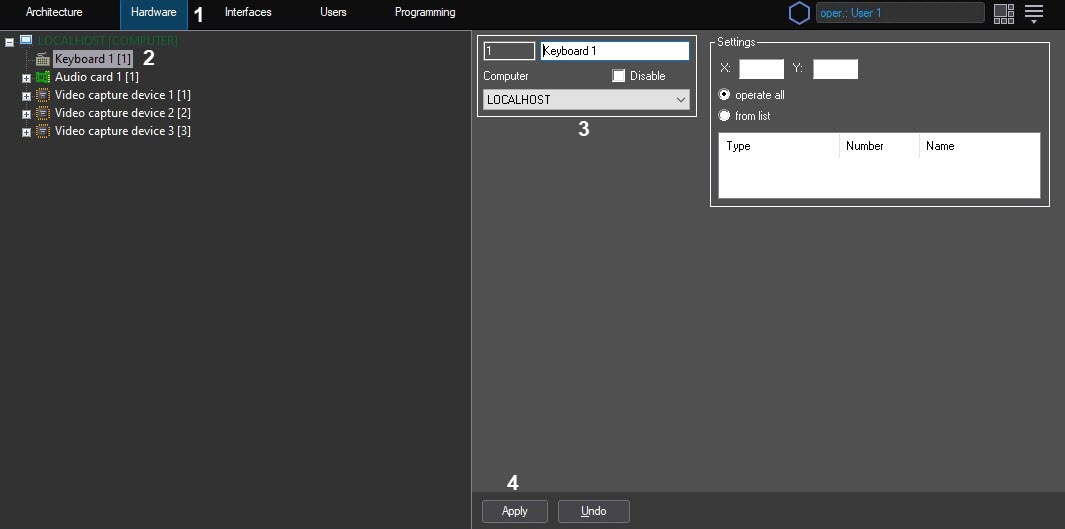
- Create the Keyboard system object on the base of the Computer object or select the relevant object in the objects tree on the Hardware tab of Axxon PSIM settings panel (2).
Enter the ID of the created object, its name and select the Computer system object to be the parent one for the Keyboard object (3).
The Computer system object should match the computer, to which the Special keyboard device is connected.- Click Apply (4).
See Settings the interpretation rules of the Special keyboard layout by Axxon PSIM program complex section for further configuration.
Note.
Please refer to the Axxon PSIM™ version 4.9.8 documentation for instructions on the discontinued PROMAG keyboard configuration: Setting up and connecting the special keyboard.
Overview
Content Tools