
Go to documentation repository


To open the query file do one of the following:
- Specify the disk where the query file is. For this:
- Select Open disk in the File menu.

Select the query file in the drop-down list (1).

Note.
The Removable disks are not found message will be displayed if the removable storage is not found while openning the query file.- Click the OK button (2).
The utility detects and opens the query file which is in the root of selected disk. - Select the query file manually. For this:
- Select Open file in the File menu.
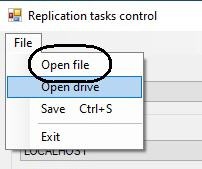
- Select the itv_task.xml file containing the query parameters using the standard opening dialog.
The query file is now opened.
Overview
Content Tools