
Go to documentation repository


On the page:
Configuring the Hikvision DS-1200KI control device before adding it to Axxon PSIM
Configure the Hikvision DS-1200KI PTZ control device as follows before creating the corresponding object in Axxon PSIM:
- Set the control device address: Select System - Network in the device internal menu, then disable DHCP and set IP address and gateway.

Set the Axxon PSIM server IP address and port on the device: Open the device web interface by entering the above set IP address in the web browser, then select Platform Access - Third-Party Platform.
Note.
The web interface is only available on https by default, so please use https prefix before the IP address.

- Set the 8. Private VMS mode in the device's internal interface.

- Transfer the PTZ control device to operating mode by one of the following actions:
- Select any monitor MON (monitor) [integer in the range 1-9999], any camera CAM (camera) [integer in the range 0-999999]; in this mode all keys will work, including the WIN (subwindow of video wall) and MULT (layout size) keys for the monitor and camera.
- Select any camera CAM (camera) [integer number in the range 1-999999 (number 0 is available only when setting the monitor)]; the WIN, MULT and CAM-G keys will not work in this mode.
Select any monitor MON (monitor) [integer in the range 1-9999] and any group of cameras CAM-G (camera group) [integer in the range 1-999999]; in this mode, only the MULT, OK keys and the rotations of the joystick axes will work.
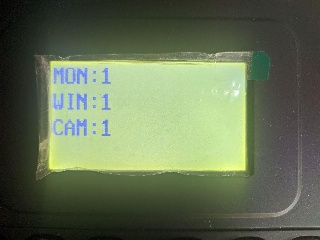
Note.
To select these parameters, enter a number on the device keypad, then press the corresponding key (MON / WIN / CAM / CAM-G).
If the server IP address and/or port is not accessible from the PTZ control device, the "Connect failed" message will be displayed on the control device screen after pressing the MON / WIN / CAM / CAM-G keys.
The Hikvision DS-1200KI PTZ control device is now preconfigured.
Configuring the Hikvision DS-1200KI control device in Axxon PSIM
Note.
Make sure that DisableInternalJoystick registry key has its default value of 1 (see Registry keys reference guide) before proceeding with control device configuration in Axxon PSIM.
To configure the connection of the Hikvision DS-1200KI control device to the Axxon PSIM software package, proceed as follows:
- Create the Control device object under the Computer object on the Hardware tab of the System settings dialog window (1).
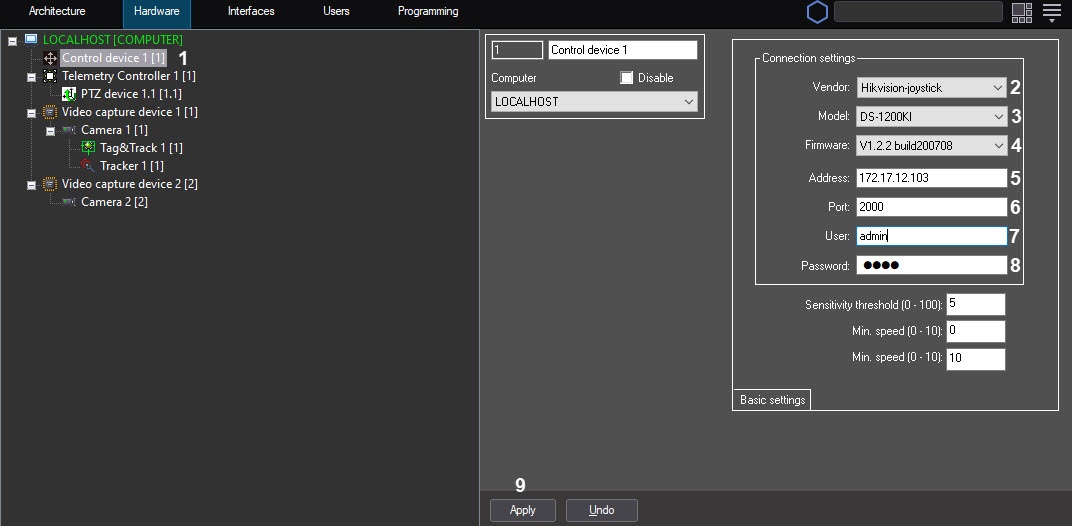
- Select Hikvision-joystick from the Vendor drop-down list (2).
- Select DS-1200KI from the Model drop-down list (3).
- Select V1.2.2 build20051 from the Firmware drop-down list (4).
- In the Address field, enter the IP address of the control device (5).
- In the Port field, enter the port of the control device (6).
- In the User field, enter the username to access the device (7).
- In the Password field, enter the password to access the device (8).
- Click the Apply button (9).
Configuring the connection of the Hikvision DS-1200KI control panel to the Axxon PSIM software package is now complete.
Features of the Hikvision DS-1200KI control device operation in Axxon PSIM
When the MULT, PRESET, PATROL, or PATTERN keys are pressed on the device, the following actions are performed:
- when entering a number in the range 1-99 and pressing MULT for each number, Axxon PSIM receives a message about pressing the corresponding separate key with a number in the range 23-121 (B22-B120);
- when pressing PresetRec for the first time, Axxon PSIM receives a message about pressing key 13 (B12), and the device displays Record started;
- after pressing PresetRec for the second time, Axxon PSIM receives a message about pressing key 12 (B11), and Record ended appears on the device display;
- when entering a number in the range 1-65535 and pressing PresetRec, Axxon PSIM receives a message about pressing key 22 (B21), and the device displays PRESET:;
- when entering a number in the range 1-65535 and pressing Patrol, Axxon PSIM receives a message about pressing key 17 (B16), and the device displays PATROL:;
- when entering a number in the range 1-65535 and pressing PatternPlay, Axxon PSIM receives a message about pressing key 18 (B17), and the device displays PATTERN:;
- when entering a number in the range 65536-999999 and press any of the PresetRec / Patrol / PatternPlay buttons, nothing happens: such numbers are not processed.
JScript example
The link contains a file with a script in the JScript language, which allows you to assign actions to the keys of the Hikvision DS-1200KI telemetry control panel as follows:
Key | Code | Action |
| CAM | 21 | Select a camera |
| MON | Select a monitor | |
| WIN | Used together with number buttons to select the surveillance window | |
| PRESET | 22 | Used together with number buttons to open a preset |
| IRIS+ | 7 | Increase the exposure value (iris) |
| IRIS- | 8 | Decrease the exposure value (iris) |
| PATROL | 17 | |
| PATTERN | 18 | |
| PREV | 15 | Switch to the previous camera |
| NEXT | 16 | Switch to the next camera |
| CAM-G | 20 | Used together with number buttons to select a group of cameras |
| ZOOM+ | 1 | Zoom in |
| ZOOM- | 2 | Zoom out |
| WIPER | 6 | Turn on the wiper |
| LIGHT | 5 | Turn on the backlight |
| FOCUS+ | 3 | Increase the focal length |
| FOCUS- | 4 | Decrease the focal length |
Overview
Content Tools