You are viewing an old version of this page. View the current version.
Compare with Current
View Page History
« Previous
Version 8
Next »
The passing vehicle data is displayed in the Events monitor window.
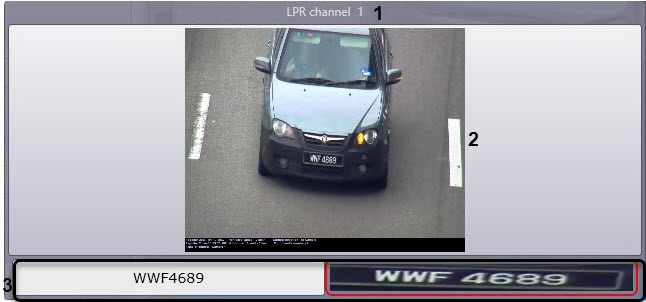
In the Events monitor window, the following data is displayed:
- License plate recognizer (the name of the corresponding LPR channel object) (1);
- An image of a vehicle a caption in the black area, which can contain the following data (2):
- date and time of receiving the vehicle data;
- vehicle license plate;
- country;
- type of license plate (only for the Vehicle type recognition module, RR vendor and model recognizer module, or AR MMR module);
- vehicle speed;
- vehicle direction;
- speed, permitted on the controlled road area;
- ID of speed detector;
- control point—name of the camera that captured the vehicle;
- vehicle vendor (only for the Vehicle type recognition module, RR vendor and model recognizer module, or AR MMR module);
- vehicle model (only for the Vehicle type recognition module, RR vendor and model recognizer module, or AR MMR module);
- vehicle color (only for the Vehicle type recognition module, RR vendor and model recognizer module, or AR MMR module);
- other information about the speed detector (see Setting up the frame sign parameters).
Recognized license plate and the license plate image (3).


