
Go to documentation repository
Previous page Next page
The Neurotracker module registers object tracks in the camera FOV during recording using a neural network and saves them to the VMDA metadata storage (see Creating and configuring VMDA metadata storage).
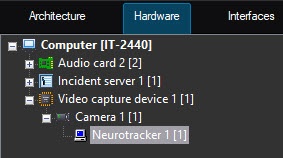
The Neurotracker module is configured on the settings panel of the Neurotracker object. This object is created on the basis of the Camera object on the Hardware tab of the System settings dialog window.
The Neurotracker module is configured as follows:

Set the Generate event on appearance/disappearance of the track checkbox (1), if it is necessary to generate the event when the track appears/disappears.
Note
The track appearance/disappearance events are generated only in the debug window (see Start the debug window). They are not displayed in the Events protocol.
Set the Save tracks to show in archive checkbox (3), if it is necessary to highlight the detected object with a frame when viewing the archive.
Note
This parameter does not affect VMDA search and is used just for the visualization. For this parameter, the titles database is used.
 button (5) and select the file in the standard Windows Explorer window that opens. If the field is left blank, the default neural networks will be used for detection. They are selected automatically depending on the selected object type (4) and device (8).
In the Recognition threshold [0, 100] field (6), specify the neurocounter sensitivity—an integer value in the range from 0 to 100.
Note
The objects detection threshold is determined experimentally. The lower the detection threshold, the more false triggerings there might be. The higher the detection threshold, the less false triggerings there might be, however, some useful tracks might be skipped. See Examples of configuring neural tracker for solving typical tasks.
In the Track hold time (s) field (10), specify the time in seconds after which the object track is considered lost. This parameter is useful in situations where one object in the frame temporarily overlaps another. For example, when a large car completely overlaps a small one.
Note
If the object track is close to the frame boundary, then approximately half the time specified in the Track hold time (s) field should elapse from the moment the object disappears from the frame until its track is deleted.


Set the Enable filtering checkbox (1).
Select the required neural network file for the neural filter (2). If the network path is not set, then the default network is used depending on the selected device (3). If the network path is specified, the neurofilter is created with the specified network.
Click the Apply button (13).
Note
If necessary, create and configure the NeuroTracker VMDA detection tools on the basis of the Neurotracker object. The procedure of creating and configuring the NeuroTracker VMDA detection tools is similar to creating and configuring the VMDA detection tools for a regular tracker. The only difference is that it is necessary to create the NeuroTracker VMDA detection tools on the basis of the Neurotracker object, and not the Tracker object (see Creating and configuring the VMDA detection). Also, if you select the Staying in the area for more than 10 sec detector type, the time the object stays in the zone, after which the NeuroTracker VMDA detection tools are triggered, is configured using the LongInZoneTimeout2 registry key, not LongInZoneTimeout. The procedure of configuring the alarm generation mode for any type of VMDA detection tools is similar to the VMDA detection tools for a regular tracker using the VMDA.oneAlarmPerTrack registry key (see Registry keys reference guide).
The Neurotracker software module configuration is complete.
If events are periodically received from several objects, then for convenience, you can create and configure neurotracker track counters (see Configuring the neurotracker track counter).

